
Honda Odyssey Owners Manual: Center Pocket
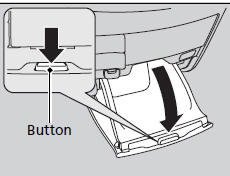
Press the button to open the center pocket. ■ Using the center pocket as a cool box*
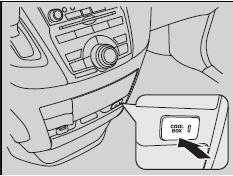
While the air conditioner is in use, you can store items in the center pocket to keep them cool. Press the COOL BOX button to cool inside the center pocket (indicator on). NOTICE Do not put opened cans, or uncovered containers with loose ice inside the cool box. Spilled liquids can damage the upholstery and electrical components in and around the cool box. The cool box is not a refrigerator. It only keeps chilled beverages cool. The climate control system continues to cool the cool box when the heater is turned on. Pressing the COOL BOX button automatically turns on the air conditioning system.
The cool box automatically turns off if: |


See More:
Honda Odyssey Service Manual > Front Damper/Spring Disassembly, Inspection, and Reassembly: Disassembly
Compress the damper spring, then remove the self-locking nut (A) while holding the damper shaft with a hex wrench (B). Do not compress the damper spring more than necessary to remove the self-locking nut. BA12 x 1.25 mmReplace. Release the pressure from the strut spring compressor, then disassemble ...
Honda Odyssey Owners Manual
- Quick Reference Guide
- Safe Driving
- Instrument Panel
- Controls
- Features
- Driving
- Maintenance
- Handling the Unexpected
- Information
Honda Odyssey Service Manual
