
Honda Odyssey Owners Manual: Center Pocket
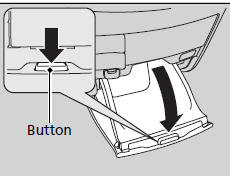
Press the button to open the center pocket. ■ Using the center pocket as a cool box*
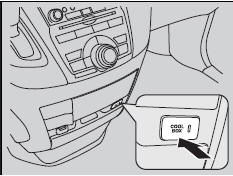
While the air conditioner is in use, you can store items in the center pocket to keep them cool. Press the COOL BOX button to cool inside the center pocket (indicator on). NOTICE Do not put opened cans, or uncovered containers with loose ice inside the cool box. Spilled liquids can damage the upholstery and electrical components in and around the cool box. The cool box is not a refrigerator. It only keeps chilled beverages cool. The climate control system continues to cool the cool box when the heater is turned on. Pressing the COOL BOX button automatically turns on the air conditioning system.
The cool box automatically turns off if: |


See More:
Honda Odyssey Owners Manual > Engine Coolant: Radiator
1. Make sure the engine and radiator are cool. 2. Turn the radiator cap counterclockwise and relieve any pressure in the coolant system. Do not push the cap down when turning. 3. Push down and turn the radiator cap counterclockwise to remove it. 4. The coolant level should be up to the base of the ...
Honda Odyssey Owners Manual
- Quick Reference Guide
- Safe Driving
- Instrument Panel
- Controls
- Features
- Driving
- Maintenance
- Handling the Unexpected
- Information
Honda Odyssey Service Manual
