
Honda Odyssey Owners Manual: Battery
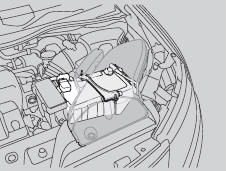
Checking the Battery
the sensor on the negative terminal. If there is a problem with the sensor, the warning message on information display*/multiinformation display* will let you know. Have your vehicle checked by a dealer. Check the battery terminals for corrosion monthly.
If your vehicle's battery is disconnected or goes dead: WARNING A spark or flame can cause the battery to explode with enough force to kill or seriously hurt you. When conducting any battery maintenance, wear protective clothing and a face shield, or have a skilled technician do it. WARNING: Battery post, terminals, and related accessories contain lead and lead compounds. Wash your hands after handling. When you find corrosion, clean the battery terminals by applying a baking powder and water solution. Clean terminals with a damp towel. Cloth/towel dry the battery. Coat the terminals with grease to help prevent future corrosion. Charging the Battery Disconnect both battery cables to prevent damaging your vehicle's electrical system. Always disconnect the negative (–) cable first, and reconnect it last. |


See More:
Honda Odyssey Service Manual > Day Time Running Lights System Description: HID Unit Replacement
Turn the combination light switch OFF. Make sure the ignition switch is in LOCK (0) position, then do the battery terminal disconnection procedure. Remove the headlight assembly. Remove the three mounting screws and the HID unit (A). BCA Disconnect the 4P connector (B) from the HID unit. Inspect the ...
Honda Odyssey Owners Manual
- Quick Reference Guide
- Safe Driving
- Instrument Panel
- Controls
- Features
- Driving
- Maintenance
- Handling the Unexpected
- Information
Honda Odyssey Service Manual
