
Honda Odyssey Owners Manual: Playing the AM/FM Radio
Auto Select Use the auto select feature to scan both bands and store the strongest station in each preset.
1. Press the SETUP button.
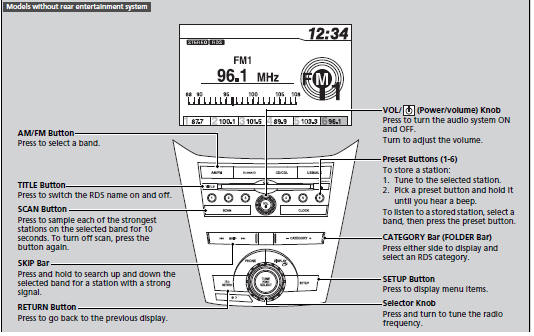
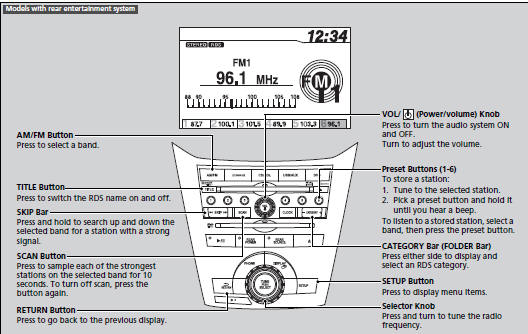
To turn off auto select, press The ST indicator appears on the display indicating stereo FM broadcasts. Stereo reproduction in AM is not available. Switching the Audio Mode Press the MODE button on the steering wheel. You can store six AM stations and twelve FM stations into the preset button memory. FM1 and FM2 let you store six stations each. Auto Select function scans and stores up to six AM stations and twelve FM stations with a strong signal into the preset button memory. If you do not like the stations auto select has stored, you can manually store your preferred frequencies. Radio Data System (RDS) Provides text data information related to your selected RDS capable FM station.
■ RDS INFO ON ■ To find an RDS station from your selected program category
1. Press the FOLDER bar or the CATEGORY
bar to display and select an RDS category. The ST indicator appears on the display indicating stereo FM broadcasts. Stereo reproduction in AM is not available. Switching the Audio Mode Press the MODE button on the steering wheel. You can store six AM stations and twelve FM stations into the preset button memory. FM1 and FM2 let you store six stations each. A.SEL function scans and stores up to six AM stations and twelve FM stations with a strong signal into the preset button memory. If you do not like the stations auto select has stored, you can manually store your preferred frequencies. |
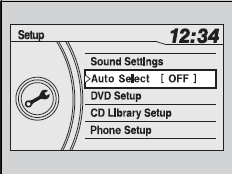
 to select Auto Select,
then press
to select Auto Select,
then press
 .
. .
. again. This
restores the presets you originally set.
again. This
restores the presets you originally set.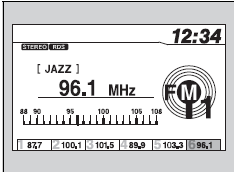


See More:
Honda Odyssey Service Manual > Steering: Hydraulic Power Steering Hose, Line, and Pressure Switch Replacement
Note these items during installation: Connect each hose to the corresponding line securely until it contacts the stop on the line. Install the clamp or adjustable clamp at the specified distance from the hose end as shown. Check all clamps for deterioration or deformation; replace the clamps with ne ...
Honda Odyssey Owners Manual
- Quick Reference Guide
- Safe Driving
- Instrument Panel
- Controls
- Features
- Driving
- Maintenance
- Handling the Unexpected
- Information
Honda Odyssey Service Manual
