
Honda Odyssey Owners Manual: Compatible iPod® and USB Flash Drives
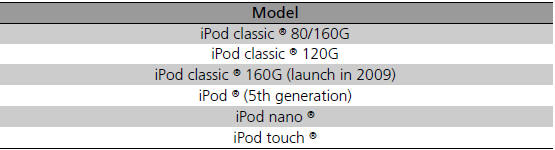
■iPod® Model Compatibility
This system may not work with all software versions of these devices. ■USB Flash Drives • Use a recommended USB flash drive of 256 MB or higher. Files on the USB flash drive are played in their stored order. This order may be different from the order displayed on your PC or device. |


See More:
Honda Odyssey Service Manual > Window Control: Front Passenger's Power Window Switch Replacement
Carefully remove the front passenger's power window switch panel (A). AB Disconnect the 37P connector (B) from the front passenger's power window switch. Remove the four screws and the front passenger's power window switch (A). A Install the switch in the reverse order of removal. Resetting the pow ...
Honda Odyssey Owners Manual
- Quick Reference Guide
- Safe Driving
- Instrument Panel
- Controls
- Features
- Driving
- Maintenance
- Handling the Unexpected
- Information
Honda Odyssey Service Manual
