
Honda Odyssey Owners Manual: Parking Your Vehicle
Do not park your vehicle near flammable objects, such as dry grass, oil, or timber. Heat from the exhaust can cause a fire. When Stopped 1. Depress the brake pedal firmly with the shift lever in
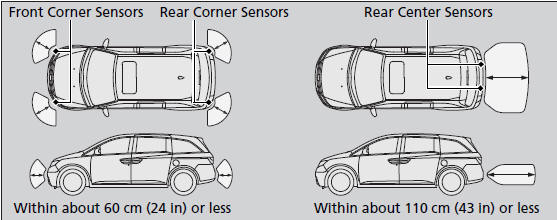
Always set the parking brake firmly, in particular if you are parked on an incline. NOTICE The following can damage the transmission: Raise the wiper arms when snow is expected. Parking Sensor System The corner and rear center sensors monitor obstacles around your vehicle, and the beeper and display let you know the approximate distance between your vehicle and the obstacle. ■ The sensor location and range
Even when the system is on, always confirm if there is no obstacle near your vehicle before parking.
The system may not work properly when:
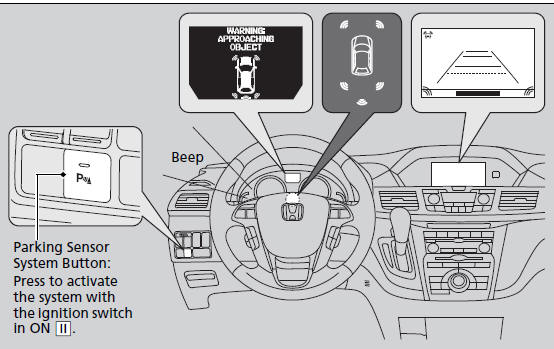
The system may not sense: Do not put any accessories on or around the sensors. ■ When you activate the system
The indicator in the button comes on and the beeper sounds when the system is on.
The corner sensors start to detect an obstacle when the shift lever is in any
position
other than
The rear center sensors start to detect an obstacle when the shift lever is in
When you turn the ignition switch to ON
■ When the distance between your vehicle and obstacles behind becomes shorter
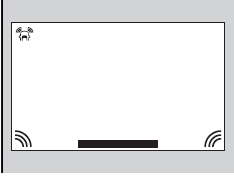
*1: At this stage, only the center sensors detect obstacles. ■ The parking sensor system on audio/navigation screen
• An appropriate indicator blinks when there
are any obstacles around the parking
sensors. The color of the indicator changes
in accordance with the distance between
your vehicle and obstacles. Models without navigation system Models without navigation system ■Turning off All Rear Sensors 1. Make sure that the parking sensor system is not activated. Turn the
ignition
switch to LOCK To turn the rear sensors on again, follow the above procedure. The beeper sounds three times when the rear sensors come back on. When you shift to |
 .
. to
to
 .
.
 , and the vehicle speed
is less than 5 mph (8 km/h).
, and the vehicle speed
is less than 5 mph (8 km/h). , and
the vehicle speed is less than 5 mph (8 km/h).
, and
the vehicle speed is less than 5 mph (8 km/h). , the
system will be in the previously selected condition.
, the
system will be in the previously selected condition.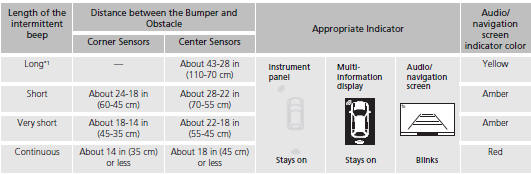
 .
. .
. , the indicator
in the parking
sensor system button blinks as a reminder that the
rear sensors have been turned off.
, the indicator
in the parking
sensor system button blinks as a reminder that the
rear sensors have been turned off.

See More:
Honda Odyssey Owners Manual > Information: Warranty Coverages
■ U.S. Owners Your new vehicle is covered by these warranties: New Vehicle Limited Warranty – covers your new vehicle, except for the emissions control systems and accessories, against defects in materials and workmanship. Emissions Control Systems Defects Warranty and Emissions Performance ...
Honda Odyssey Owners Manual
- Quick Reference Guide
- Safe Driving
- Instrument Panel
- Controls
- Features
- Driving
- Maintenance
- Handling the Unexpected
- Information
Honda Odyssey Service Manual
