
Honda Odyssey Owners Manual: Adjusting the Sound
Press the SETUP button, and rotate
The SVC has four modes: OFF, LOW, MID, and HIGH. SVC adjusts the volume level based on the vehicle speed. As you go faster, audio volume increases. As you slow down, audio volume decreases. |
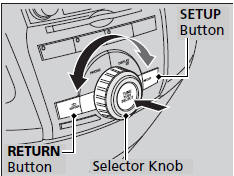
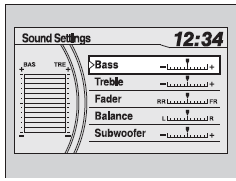
 to
adjust the setting. Rotate
to
adjust the setting. Rotate  to scroll
through
the following choices:
to scroll
through
the following choices: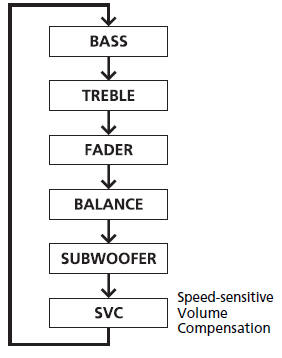


See More:
Honda Odyssey Service Manual > Compass: Zone Selection
Turn the ignition switch to ON (II), or press the engine start/stop button to select the ON mode. Make sure the center display is in the main screen of any function. Press and hold the ENTER on the center switch panel for about 5 seconds. The center display shows the Compass settings main menu. BACK ...
Honda Odyssey Owners Manual
- Quick Reference Guide
- Safe Driving
- Instrument Panel
- Controls
- Features
- Driving
- Maintenance
- Handling the Unexpected
- Information
Honda Odyssey Service Manual

© 2018-2026 Copyright www.hodyssey.net
0.0098